As an Amazon Associate, we earn from qualifying purchases. Some links on this site are affiliate links at no extra cost to you. Our recommendations are based on thorough research and editorial judgment.

Choosing External SSDs For 8K Video Editing

When we choose external SSDs for 8K video editing, we need to prioritize speed, capacity, and durability. Look for NVMe models with Thunderbolt 3 or 4 interfaces for maximum performance, as they can handle high-bitrate streams with ease. A minimum of 1 TB is essential for shorter edits, while a capacity of 3 TB to 4 TB is ideal for RAW footage. By considering these factors, we can greatly enhance our editing experience and tackle larger projects effectively. For further insights, let’s explore more options.
Key Takeaways
- Select NVMe SSDs or RAID configurations to meet the high bandwidth demands of uncompressed 8K video editing, exceeding 995 MB/s.
- Opt for Thunderbolt 3 or 4 connections for superior speeds, ensuring compatibility with devices for handling high-bitrate streams.
- Choose external SSDs with at least 1 TB storage for shorter edits and 3 TB to 4 TB for RAW workflows to accommodate large project sizes.
- Look for rugged designs with IP55 ratings for dust and water resistance, ensuring durability in various work environments.
- Ensure your system has sufficient RAM (32GB to 64GB) to manage high-resolution footage and improve editing performance.
Speed Requirements for 8K Video Editing SSDs
You may be interested



When we plunge into the world of 8K video editing, speed is our best friend. The bandwidth demands for uncompressed 8K UHD video reach nearly 995 MB/s, making it crucial to choose the right SSD. For ProRes 422, we see codec impact with speeds of 251 MB/s for 24fps and 314 MB/s for 30fps. If we’re tackling multicam editing, the stakes rise considerably; handling 11 streams of 8K ProRes 422 can approach 2.76 GB/s. To meet these needs, NVMe SSDs or RAID configurations are essential, as SATA SSDs typically fall short. By prioritizing high-speed options, we can guarantee smooth playback and seamless editing, allowing our creativity to shine without technical interruptions.
Recommended Products

Extreme PCIe 5.0 Performance:Utilizing the latest PCIe 5.0 interface, bandwidth is doubled to approximately 64 GT/s, delivering sequential read speeds up to 14000 MB/s—ideal for 8K video editing, large‑scale gaming, AI training, and database acceleration

Ideal for high speed, low power storage

🚨 𝗩𝗼𝗹𝘂𝗺𝗲 𝗣𝗿𝗶𝗰𝗶𝗻𝗴 𝗔𝘃𝗮𝗶𝗹𝗮𝗯𝗹𝗲, 𝗥𝗲𝗾𝘂𝗲𝘀𝘁 𝗬𝗼𝘂𝗿 𝗕𝘂𝗹𝗸 𝗤𝘂𝗼𝘁𝗲 𝗧𝗼𝗱𝗮𝘆! GEEKOM IT13 MAX with Intel Core Ultra 9 185H (16 cores, up to 5.1 GHz) and 16GB DDR5 delivers flagship AI performance for high-compute bulk deployments. Ideal for AI creative studios, film production, automotive R&D simulation, medical imaging workstations, enterprise server clusters, and financial trading floors. Supports quad 8K/4K displays via dual USB4 and dual HDMI, idea for multi-screen data visualization. Features dual 2.5GbE LAN, Wi-Fi 7, IceBlast 3.0 cooling for sustained silent operation. Upgradeable memory and storage. Backed by a 3-Year Support.
Connectivity Interfaces and Compatibility
As we explore our options for external SSDs, understanding connectivity interfaces and compatibility is vital for optimizing our video editing workflows. Currently, USB-C is the most widely supported interface, providing broad compatibility with modern devices. It delivers impressive speeds, though we may encounter compatibility challenges when using high-bitrate 8K streams. On the other hand, Thunderbolt 3 and 4 offer superior bandwidth, making them ideal for 8K editing, with speeds exceeding 2,600 MB/s. However, we must confirm our devices support these connections. Additionally, checking the file system format is essential to prevent read/write issues. By being mindful of interface trends, we can select the right SSD that seamlessly fits into our editing setup, guaranteeing a smooth creative process.
Recommended Products
![Maxonar [3.3Ft] Thunderbolt 4 Cable, 240W Thunderbolt Cable 40Gbps Sync 8K/5K@60Hz Display and for Thunderbolt 4, Thunderbolt 3, USB4, and USB-C Devices](https://m.media-amazon.com/images/I/41rfKIRgt2L._SL500_.jpg)
Future-Proof & Universally Compatible – Maxonar Thunderbolt 4 Cable not only supports the latest Thunderbolt 4 technology but is also backward compatible with Thunderbolt 3, USB4, and USB-C 3.2/3.1/2.0 devices—giving you the freedom to connect effortlessly today and tomorrow

Crafted as a professional data transfer cable, this Duttek short USB C to USB C cable delivers 80Gbps bidirectional speed and supports up to 120Gbps unidirectional transfer. This flat USB C cable works perfectly with Thunderbolt and USB4 devices. The 5-inch short usbc to usbc cable accelerates large SSD file and ultra HD video transmission, greatly boosting your daily data backup and file organization efficiency.

Turbocharged Speeds: Achieve sustained transfer rates up to 2800 MB/s, turning hours of work into minutes.
Storage Capacity Needs for 8K Video Projects

Understanding our storage capacity needs is vital if we want to effectively manage 8K video projects. The storage requirements for these projects can vary greatly. For example, a 30-minute compressed 8K video at 470 Mbps demands around 105 GB. However, when we opt for RAW or high-bitrate formats, project sizes can soar to 1–3 TB or more. It’s important to factor in backup and multiple versions, which further inflate our total storage demands. As our projects grow, we should consider external SSDs starting at 1 TB for shorter edits but aim for 3 TB to 4 TB for RAW workflows. Ample space allows for raw footage, edits, and backups, ensuring we’re ready for larger projects without interruptions in our editing process. Planning for future scalability guarantees we’re ready for larger projects without interruptions in our editing process.
Recommended Products

Get NVMe solid state performance with up to 1050MB/s read and 1000MB/s write speeds in a portable, high-capacity drive(1) (Based on internal testing; performance may be lower depending on host device & other factors. 1MB=1,000,000 bytes.)
Get NVMe solid state performance with up to 1050MB/s read and 1000MB/s write speeds in a portable, high-capacity drive(1) (Based on internal testing; performance may be lower depending on host device & other factors. 1MB=1,000,000 bytes.)

Note: Magsafe is not available in this version
Durability and Portability Considerations
Selecting the right external SSD for video editing goes beyond just storage capacity; it’s also about how well these drives can withstand the rigors of our work environment. We need drives with a rugged design to protect our valuable data. SSDs, lacking moving parts, naturally resist shocks and vibrations, making them ideal for on-location shoots. Many models feature IP55 ratings for dust and water resistance, ensuring data protection against unpredictable conditions. Plus, their compact size means we can easily carry multiple drives without adding bulk. With integrated cable holders and reinforced connectors, we can minimize wear and tear while moving around. Choosing the right SSD combines reliability and convenience, ultimately enhancing our editing workflow.
Recommended Products

GO THE DISTANCE: Withstand whatever adventure with the wildly reliable T7 Shield; It’s designed for the elements with water1, dust2 and drop3 resistance—all, of course, at lightning speeds

Customize your drive’s RGB lighting with the downloadable WD_BLACK Dashboard (Windows only) to show off your style and make every play personal.
GO THE DISTANCE: Withstand whatever adventure with the wildly reliable T7 Shield; It’s designed for the elements with water1, dust2 and drop3 resistance—all, of course, at lightning speeds
System Requirements and RAM Support
When choosing an external SSD for video editing, it’s vital to take into account the system requirements and RAM support to guarantee a seamless editing experience. First, we need to verify our SSD’s interface matches our computer’s ports, like USB-C or Thunderbolt. For peak performance, Thunderbolt 3/4 connections can handle multiple 4K video streams, making them suitable for 8K editing at lower frame rates. Next, RAM upgrades are essential; while 8GB is a starting point, professionals often benefit from 32GB to 64GB to manage high-resolution footage effectively. This increase in RAM directly impacts our ability to handle multiple streams and real-time playback, guaranteeing smooth editing sessions and better performance enhancement throughout our workflow.
Top External SSD Models Recommended for 8K Video Editing
In the ever-evolving world of video editing, choosing the right external SSD is essential for those of us tackling 8K projects. The LaCie Rugged SSD Pro 5 stands out with its Thunderbolt 5 interface, boasting impressive performance benchmarks of up to 6,700 MB/s read speeds. Meanwhile, the Crucial X9 Pro offers solid user reviews for its 1,050 MB/s speeds, making it a reliable option for seamless editing. For those needing speed and capacity, the SanDisk G-Drive Pro Studio SSD delivers 2,600 MB/s and up to 7.68TB. Finally, the Crucial X10 Pro enhances efficiency with its portable design and 2,100 MB/s speeds. These choices cater to various editing needs, ensuring our workflows remain efficient and effective.
Recommended Products

Industry-leading read/write speeds up to 2,000MB/s. Requires compatible devices to reach USB 3.2 Gen 2x2 USB-C Performance.
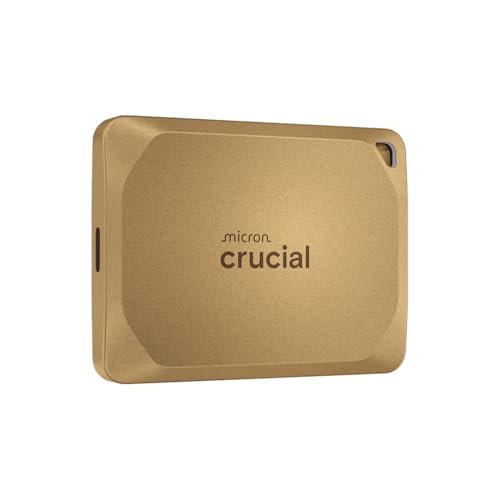
Ultra-fast Speeds: Designed for professional creators, this external SSD delivers fast data access with up to 2,100MB/s read and 2,000MB/s write speeds for a seamless workflow. Unlike a hard drive, SSDs offer significantly faster performance

【80Gbps Ultra-High-Speed Data Transfer】 Positioned as a premium USB-C male to female extension cable — a top-tier USB-C extension cable — it leverages USB5 technology to deliver 80Gbps bidirectional transfer speed. As a high-performance USB-C extension cable, it seamlessly transmits 16K@60Hz, 8K@120Hz, and dual 8K@60Hz videos as well as large files, while being backward compatible with all USB4/3/2 devices — making this USB-C extension cable (male to female) a powerful powerhouse for data transfer.
Benefits of Thunderbolt 5 for Video Editing
As we plunge into video editing, understanding the benefits of Thunderbolt 5 can greatly enhance our workflow. With its remarkable 120 Gbps bandwidth, we can experience performance optimization like never before. This means seamless handling of 8K video and complex AI tasks without a hitch.
Moreover, Thunderbolt 5 supports multiple high-resolution displays, allowing us to manage intricate timelines with ease—perfect for color grading and detail inspection. Its high-speed transfer rates, often exceeding internal SSDs, make it ideal for scratch disks and live editing volumes. Plus, the ability to connect power-hungry devices simplifies our setups, boosting workflow efficiency considerably. This technology truly elevates our editing capabilities, making every project smoother and more manageable.
Choosing the Right SSD Capacity for Your Projects
Choosing the right SSD capacity for our video editing projects can greatly impact our workflow and project outcomes. For 8K editing, we should aim for at least 2TB to accommodate the large file sizes generated. As we engage with complex projects, opting for higher capacities can help us avoid the hassle of frequent transfers or deletions.
It’s wise to stay informed about SSD pricing trends, as larger capacities often provide better durability and performance. When making SSD brand comparisons, consider those that offer robust support for high-capacity models. Investing in ample storage not only enhances editing efficiency but also guarantees we have enough space for cache files, which are vital for smooth playback and rendering.
Ensuring Reliability and Warranty Coverage
When we immerse ourselves in video editing, especially with demanding formats like 8K, ensuring the reliability of our external SSDs becomes essential. Most premium SSDs come with 5-year limited warranties, showcasing the manufacturer’s confidence in their products. These warranties typically cover hardware defects, which is vital for protecting our investments. However, we should pay attention to warranty policies regarding wear-related issues, like NAND cell degradation.
Additionally, we can enhance data integrity by choosing SSDs known for their reliability, such as the Samsung T7 series. Features like AES 256-bit encryption and built-in error correction can also safeguard our valuable footage. So, let’s prioritize both reliability and strong warranty coverage for seamless editing experiences.
Frequently Asked Questions
How Does Temperature Affect the Performance of External SSDS?
When we consider how temperature affects external SSDs, we can’t ignore thermal throttling effects. Maintaining ideal operating temperatures guarantees our devices perform well and last longer, preventing data loss and preserving integrity during intense workloads.
Can I Use an External SSD for Gaming as Well?
Yes, we can definitely use an external SSD for gaming! It enhances gaming performance considerably, as long as we verify SSD compatibility with our device’s interface. This way, we’ll enjoy faster load times and smoother gameplay.
What Is the Lifespan of an External SSD?
While some might worry about SSDs failing, we find their lifespan typically ranges from 5 to 10 years, depending on write endurance and usage. Proper care can greatly enhance SSD longevity and data reliability.
Are There Any Specific Brands to Avoid for Video Editing?
When considering brand reliability, we should avoid lesser-known SSDs that lack performance benchmarks. They often underperform and may compromise our video editing experience, so sticking to established brands is essential for consistent results.
How Do I Secure My External SSD Against Data Loss?
In a world where data feels like precious treasure, we must guard it fiercely. Let’s embrace robust backup solutions and strong data encryption to shield our memories and projects from the shadows of loss and uncertainty.